Same for me.
I'm having the same issue with Ethernet
This happens to mine as well after updating. It's annoying.
Welcome to Oreo WiFi issues. S8 has had the issue for a bit. Very annoying to have to disconnect/reconnect multiple times a day.
hi can you share what brand is your wifi router? im a reboot away from oreo before i came to this post
I changed my router to Mi Router 3. For some reason, problem was solved.
I have the same problem. I have used wipe data/factory reset via recovery menu and it didnt help.
yeah, I got the same problem.... it automatically dropped when I start streaming something...
Same here, any solution???!?!
I've already tried removing my WiFi network then add again 'ONLY' after rebooting both WiFi router and mi Box.
Issue still persist; no problem with broadband (latency or packet drops) as other devices are working perfectly fine with same WiFi router and so was Mi Box before the update.
UPDATE : Easiest Possible 'FIX'
As suggested by /u/milespeters, before performing the factory reset or flashing ROM via recovery, please try changing the WiFi settings to static IP instead of DHCP.
The issue seems to be resolved on my side. I reconnected to the wifi using the wps option instead of using a wifi password. It's not dropping anymore. Fingers crossed it hold up.
WiFi is stable for me. You might want to try a factory reset, that's the first thing I did after the Oreo upgrade.
Static ip here and drops connection anyhow.
Go into settings then scroll down to apps then in system apps find google and disable it that should. Solve it
SOLUTION!!!!! Hey guys just change the band to 5ghz and your issue will be resolved
This is so annoying. Just started experiencing this issue while streaming live TV channels
After a week of nail biting situation, finally I fix WiFi connectivity issue of my Xiaomi Mi Box 3 (International Version)
Here's the details
What is the manufacturer warranty? Does anyone know?
I’ve investigating this issue for quite some time. I’ve tried everything and I am even trying the beta versions.
The only thing that actually solved everything is when I’ve bought a “Xiaomi Pro 300M WiFi Router Amplifier 2.4G Wifi Repeater Signal Extender” to get a better WiFi coverage in my house and then I thought to my self that maybe the Xiaomi TV box WiFi will work better with that repeater and guess what, no more WiFi disconnections.
I have a Vtech router which is like the DLINK, a cheap router that gets the job done. Maybe the protocol that the streamer is using is the same as the repeater since it’s the same manufacturer?
Can you believe it ? Because I can’t but apparently this what solved it for me!
Hope it will help you guys.
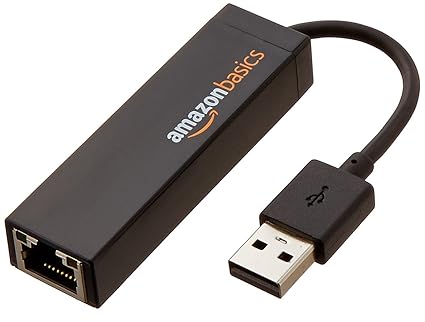
I'm late to the party in this sub, but it still may help... I have had constant wifi drops since 8.0. Wifi would drop every few minutes, even with the mi box next to the router. The solution, although not convenient for some - use a lan to usb adaptor . Turn off wifi in settings. Its working beautifully now, even at 4k, 60fps. The mi box readily accepts an adapter if youre not aware.
Hi. Same here :( I hate IT! Any fix available?
Sub:Mi Box oreo update 8.0.0 wifi disconnecting problem
Now I have a solution, Friends I had a same problem when I upgrade my Mi box to 8.0.0 and then after a day I have just switched off my wifi router and connect with my mobile hotspot then I saw that wifi is running well with mobile hotspot.
I have called to my internet provider he came and just changed my Tplink router settings like Ip address my Password and just reboot my router and then I restart my Mi box. after that my Wifi running good but sometimes disconnecting problem is showing but this is ok for me now. so friends go ahead and changed your router settings or you can connect with you mobile wifi.
I f you got the Answer please visit my Magic channel called Magic Dhoom on YouTube
Regards
I have found possible solution for this problem and it is to set malually wifi via static configuration instead of DHCP.