Any info on when the new TCL LED TVs will launch in Europe?

Here is a link for reference.

I haven't been able to find anything about a specific release date.

1 Answers

Got my new Sony Android TV, looking for the "best" IPTV provider.

Anyone can suggest me a good provider, with of course cheapest monthly fee, good service and no downtime. I'm fairly new and noob on this type of setup.

21 Answers

TVheadend on nVidia Shield TV

[deleted]

1 Answers

TV box vs Plex

After years of moving my laptop between the living room TV and the one in my bedroom (to play videos saved) I decided to buy an Android box (T9) a few days ago. My "plan" on what I wanted it to do has run into a few roadblocks. I cant figure out how to save from the box to the external harddrive plugged into it (a bit disappointing, but not a dealbreaker). All I have to do now is remove the harddrive back and forth and not a laptop (big win here for me).

Well today I was reading an article about plex and gave it a try. Placed the server on the laptop and went to add it to the new box, but then thought "maybe my Roku TV can run the app" and sure enough both my TVs can run Plex lol.

In the end all I really wanted I have without needing the Android box. I still plan on experimenting with Kodi and other things so I have no regrets on the purchase. I will be moving soon and plan on having a better home theater and Kodi sounds like it can handle the video and audio. I might need a better box (nvidia etc.)

Should add that Plex cost me additional money and money is always an important variable for most of us.

5 Answers

Dolphin emu Nvidia Shield

I was told this emulator runs gamecube games super fast no lags an all an it doesn't it lags so bad its ugh any help

5 Answers

Anyone using FitzyTV on the Shield Android TV?

In the playstore it says it's not compatible when I browse the app. I side loaded it and I noticed that sometimes the app crashes and also when playing a video, the status bar shows even though it's in full screen.

I like the concept of DVR but I would not pay for it unless it gets polished and full support is added for Android TV

6 Answers

What is an economical Android Box for gaming + streaming movies?

Hi,

Any good Android box suggestions under a reasonable price? Major purpose: gaming + movie watching.

Location: Germany.

5 Answers

Is it possible for an android box to play all videos properly without manually enabling/disabling hardware acceleration?

Hey guys,

I've been using a cheapish android box for almost two years (GooBang Doo Abox A1), and I'm getting really tired of going into settings, and disabling/enabling hardware acceleration every single time I want to watch an episode of a show.

I watch stuff mostly off my external HDD, but half the videos I have require HW acceleration to be enabled, otherwise they won't play at all. The other half requires HW acceleration disabled, or they won't play at all. It's extra frustrating that the HW Acceleration is often hidden away in the options menu, like it is in VLC or Kodi. It's like driving a stick shift, but the shifter is hidden away in the glove compartment.

Is there a player, or an OS, that actually plays videos without needing the user to manually change settings? I'm considering buying a mini PC and a wireless keyboard and just running windows, because every Android device I've had - phones, tablets, and now this android box - has behaved this way.

Is it just an issue with all Android operating systems? Every Android phone or tablet I've ever had needs hardware acceleration to be constantly turned on or off, or else the video won't play properly.

I'm considering getting an nVidia Shield, but if I need to constantly enable/disable HW acceleration even on the Shield, that is a huge deal breaker.

I used to play videos on my jailbroken PS3, and never had this problem. Even my modded original xbox from the early 2000's, with 64mb of ram and a 733MHz processor does a better job of playing videos. I know I am using a cheap android box, but it has 2 GB of ram and a quad core processor. It should play a friggin' video, ffs. Seriously, how hard is it to make a device that plays videos normally, like a PC?

Has anyone else struggled with this, and if so, how did you solve it?

Thanks in advance

9 Answers

Top 20 Android TV Apps You Should Install Right Now! 2019

[deleted]

1 Answers

Two Ways to Get Apple TV's Beautiful Screensavers on Android TV

[deleted]

3 Answers

Jump to specific channel numner in STBEMU?

[deleted]

1 Answers

Google Stadia games and pricing leaks ahead of early E3 event

"Google’s Stadia game streaming service will reportedly launch in November, priced at $11.99 Canadian dollars ($9) per month. "

https://www.theverge.com/2019/6/6/18655311/google-stadia-price-release-date-games-leak-e3-2019

"The event will be livestreamed on June 6th at 9AM PT / 12PM ET, and you can check it out right here https://www.youtube.com/watch?v=k-BbW6zAjL0. Stadia, meanwhile, is expected to launch later this year."

:

"Everything We Learned Today About Google Stadia [UPDATED]"

https://kotaku.com/everything-we-learned-today-about-google-stadia-update-1835294433

"The upcoming streaming platform Google Stadia won’t just follow the Netflix model, as many fans had hoped. It will instead have both a subscription and games for sale individually, as Kotaku previously reported. Here’s everything we learned today during Google’s “Stadia Connect” stream.

Stadia, which was announced in March, is a streaming platform designed to let you play games without a high-end console or computer. If it works as promised, it’ll let you plug a Chromecast into your television and access games through the cloud, no hardware required. The base subscription price is $10/month, with a free version planned for next year, and a Founder’s Edition bundle available for $130 this November when Stadia launches.

It’ll be a slow rollout, Google says—you’ll need that Founder’s Edition to play in 2019—the platform won’t open up further until 2020. You won’t be able to subscribe to the standard Stadia Pro subscription until next year, either.

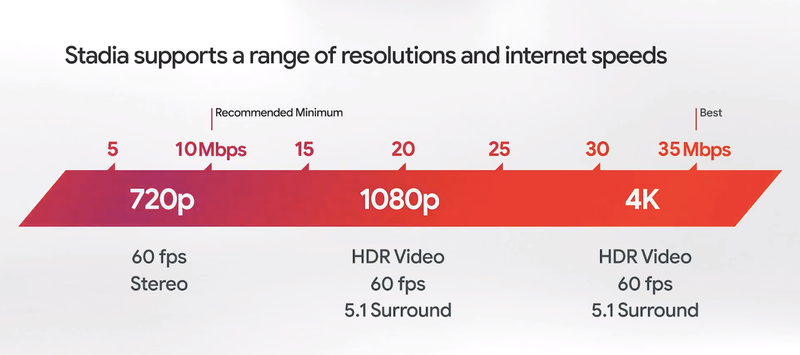
In an official stream today, Google detailed the pricing, game lineup, and other specifics. First of all, here’s how your connection will correlate with your Stadia resolution: https://i.kinja-img.com/gawker-media/image/upload/s--n3d0IdNs--/c_scale,f_auto,fl_progressive,q_80,w_800/d4hiqzy5giseqrxyfami.png

Some other announcements:

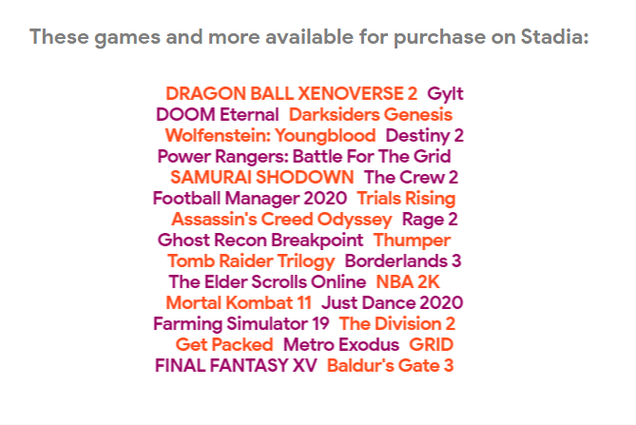
Google announced Baldur’s Gate 3 and Ghost Recon: Breakout for Stadia, the latter with a new trailer. (Don’t worry—the former is also coming to PC.)

Other games announced include Gylt, an adventure game from developer Tequila Works, and a multiplayer Overcooked-style game called Get Packed from Moonshine Studios.

The Division 2 will be there, too. Ubisoft overload!

Stadia Pro is the official service, at $10/month, which will give you access to the service’s games at 4K resolution/60 frames-per-second. This won’t include all the games, though—newer ones will be purchasable separately.

The controller is $70 standalone.

The Stadia Founder’s Edition will launch later this year for $130. It comes with a Chromecast Ultra, a Stadia controller, a copy of Destiny 2 (along with the new Shadowkeep expansion), and a three-month subscription along with a three-month buddy pass.

Other Stadia games include Assassin’s Creed Odyssey, Doom, Doom Eternal, the new Tomb Raider trilogy, Final Fantasy XV, Darksiders Genesis, Metro Exodus, and many others.

Google says it’ll be one user per Stadia account, tied to your Google ID—you can have a guest account for splitscreen, but other than that, no sharing.

“At launch, if you’re a Stadia user, you can play Stadia exclusively on Pixel 3 and 3a devices. However, you’ll be able to create your account and make subscription and game purchases from any Android M+ or iOS 11+ device that has access to the Stadia app.” https://i.kinja-img.com/gawker-media/image/upload/s--bJFGTw17--/c_fit,f_auto,fl_progressive,q_80,w_636/i3xrdalonbeozl8rupsn.png "
8 Answers

What's the most expensive, high-end Android TV box one could buy?

I don't want any Chinese cheap knock-off shit from Aliexpress

EDIT: 21% upvoted. Seems like I've offended the owners of such pos android boxes

8 Answers

Box for torrenting

[deleted]

7 Answers

The New Channels App Will Complete Your Android TV [Beta is Open]

[deleted]

2 Answers

Are there any TVs that respond to voice controls or work with Google Home?

I'm not that familiar with Android TV but I use voice commands with Google Home a lot.

10 Answers

Corrupt A95x Max.

hey! totally new to android tv in general so bear with me. the a95x max comes pre-rooted, so having a bit of experience in rooting i though i'll install supersu and have a bit of fun. install went with no issues, opened supersu and it asked me to update libraries, so i did. asked to reboot and so i did. when it rebooted it was stuck on the a95x boot logo. have attempted to reset it 3 times through the toothpick in the av port method with no luck. is there anyone who has had this happen and found a fix for it? cheers.

2 Answers

YouTube won't sign in

I'm signed into my Google account and every other Google app but YouTube isn't signed in and won't even let me? Any fix?

3 Answers

Philips Update

Finally received update here in Singapore. Any ideas what the 360 photo viewer support does?

3 Answers

What to chose?

Hello,

I'm pretty new to smart TV, chromecast, screen mirroring and all of this.
I have a relatively old HD plasma TV in my living room with a PC connected on it but I want to move the PC in another room upstairs, and have the PC screen mirrored on my TV (probably using ethernet, I think there's also wifi but I'm afraid this will cause lag). Or just any way to play Steam+Blizzard games on TV, plus popular apps like Netlifx, Youtube, etc.
I tried looking for ways to do this and I'm still a little bit confused.

From what I understand, the different ways are :

Smart TVs (wich only allow to use android tv, including versions of Netflix, Youtube and popular apps, but no way to mirror my PC games)

Steam box (but it's only PC games ?)

Nvidia shield (seems like the most complete solution which allows everything I'm looking for ?)

Roku (?)

Anything I misunderstood, any other solutions?

2 Answers

alternative to nvidia shield

is there any alternative that can play all video formats, including raw BD and does not cost over a hundred? I am considering xiaomi Mi box. Please comment.

4 Answers

Sony TV switches inputs when trying to adjust Home picture settings

The home screen with all the apps on my Sony X900F is really dark. If I go to Settings and try to go to Picture Settings, the TV automatically switches to a different input and then only shows the display settings for that input. Even if I open an app like Netflix and try to adjust the picture settings while I watch, it will only adjust the settings for "Apps (Video)" and will be dim again when I go back to the home menu. Has anyone else experienced this?

4 Answers

MiBox S with 10/10 internet.

Hello there,

Currently living in a place near 40k city, but somehow the best internet I can get (for real) is 10/10 adsl so 1,2MBPS real download speed. Is it worth buying a mi box s in this case?

I own a TCL TV with Netflix, and I must say it's working like a charm with FHD films, no buffering at all, connected to the TV by RJ45 ethernet cable, same with YouTube. And it doesn't even feel like if someone was watching FHD films on 65'' screen. I guess i'll need a USB-RJ45 adapter to get a stable 1,2mbps and don't saturate the network for other person in the house.

The thing is, I want to get rid of my TV subscription and replace it with a Mi Box, but I wonder if my internet will handle it.

Thank's!

2 Answers

Tip for the boxes that don't have Netflix or Amazon support:

I was having issues because I bought a cheap unsupported box. If you download Kodi, you can add Netflix and Amazon to the player and get all your media right there.

4 Answers

Installing Plex on Sony Bravia with Plex Media Server on a NUC Win 10 PC

If I install the Plex app from the Play Store how does it see the Plex server which is on a NUC Win 10 PC? Everything will be connected by Cat 6 cable or HDMI. No WiFi. Does Plex see all my media automatically on my NUC or will I need to point it to the Media Server?

edit: I should say that Plex Media Server is already installed on my NUC. The new part is the Sony Bravia.

2 Answers

451 / 885

Back to start